
OptaPlanner logo
  • Download
  • Learn
    • Documentation
    • Videos
    • Slides
    • Training

    • Use cases
    • Compatibility
    • Testimonials and case studies
  • Get help
  • Blog
  • Source
  • Team
  • Services
  • KIE
    • Drools
    • OptaPlanner
    • jBPM
    • Kogito
  • Star
  • T
  • L
  • F
  • YT
Fork me on GitHub

Time scheduling design patterns

Tue 1 December 2015
Avatar Geoffrey De Smet
Geoffrey De Smet

Twitter LinkedIn GitHub

OptaPlanner lead

Designing an efficient domain model for a scheduling problem that involves time (or dates) can seem difficult. Typical use cases are course timetabling, meeting scheduling, vehicle routing with time windows and TV advertisement scheduling. Let’s take a look at design patterns to model such problems in OptaPlanner.

Is starting time a planning variable?

In some cases, the starting time of planning entities doesn’t change during planning. For example in the hospital bed planning example, the arrival date of each patient is already fixed in advance (potentially by another planning stage). Therefore, none of the design patterns below apply, because the starting time is not a planning variable.

However, in many cases it does change and we do need to decide the starting time of each planning entity. In such cases, normally one of these 3 design patterns applies:
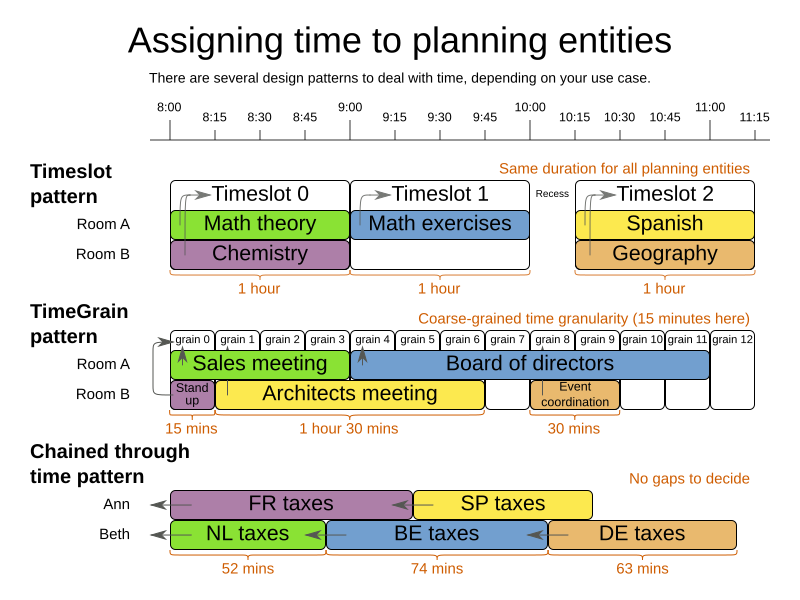
assigningTimeToPlanningEntities

Timeslot pattern

In the Timeslot pattern, all entities have the same duration. For example in course timetabling, all lecture take 1 hour. Each lecture is assigned to 1 room and 1 timeslot.

TimeGrain pattern

In the TimeGrain pattern, the entities have different durations, but they start at a course-grained time unit, such as 15 minutes. For most human activities, scheduling on second or subsecond accuracy is pointless: for example in meeting scheduling, expecting people to show up at exactly 3 seconds after 9 o’clock for a meeting is overly optimistic. Therefore scheduling on such a fine-grained accuracy would actually be counter-productive.

Chained Through Time pattern

In the Chained Through Time pattern, a person or machine continuously works on 1 planning entity at time in sequence. For example in vehicle routing with time windows, each vehicle drives from customer to customer, so it handles 1 customer at a time. The starting time of each planning entity is calculated based on the ending time of the previous planning entity.

This pattern also works well for scheduling TV advertisements, because each advertisement starts when the previous ends.

Conclusion

When facing a time scheduling problem, take a look which of the design patterns best fits your requirements. It will improve your development speed as well as solver efficiency and scalability.

For more information about the flexibility, advantages and disadvantages of each design pattern, read the documentation (6.4.0.Beta1 or later).


Permalink
 tagged as design algorithm

Comments

Visit our forum to comment

Giscus Comments

AtomNews feed
Don’t want to miss a single blog post?
Follow us on
  • T
  • L
  • F
Blog archive
Latest release
  • 8.14.0.Final released
    Wed 8 December 2021
Upcoming events
  • DevConf.CZ
    Brno, Czech Republic (virtual) - Fri 28 January 2022
    • Artificial Intelligence on Quarkus: I love it when an OptaPlan comes together by Geoffrey De Smet
  • JFokus
    Stockholm, Sweden - Mon 7 February 2022
    • AI maintenance scheduling with OptaPlanner on Quarkus by Geoffrey De Smet
  • Add event / Archive
Latest blog posts
  • OptaPlanner documentation turns over a new leaf
    Tue 26 October 2021
    Radovan Synek
  • Order picking optimization in warehouses and supermarkets with OptaPlanner
    Thu 14 October 2021
    Walter Medvedeo
  • Monitor OptaPlanner solvers through Micrometer
    Tue 12 October 2021
    Christopher Chianelli
  • A new AI constraint solver for Python: OptaPy
    Tue 5 October 2021
    Christopher Chianelli
  • How much faster is Java 17?
    Wed 15 September 2021
    Geoffrey De Smet
  • Constraint Streams get some more love
    Thu 19 August 2021
    Lukáš Petrovický
  • Let’s OptaPlan your jBPM tasks (part 2) - BPM Task assigning in the cloud
    Mon 26 July 2021
    Walter Medvedeo
  • Blog archive
Latest videos
  • AI lesson scheduling on Quarkus with OptaPlanner
    Thu 18 November 2021
    Geoffrey De Smet
  • Maintenance scheduling
    Fri 12 November 2021
    Geoffrey De Smet
  • Optimized order picking in warehouses and supermarkets
    Tue 26 October 2021
    Walter Medvedeo
  • A modern OO/FP constraint solver
    Tue 14 September 2021
    Geoffrey De Smet
  • Business processes task optimization in Kogito
    Tue 7 September 2021
    Walter Medvedeo
  • School timetable optimization
    Mon 6 September 2021
    Geoffrey De Smet
  • Schedule incoming calls real-time
    Mon 23 August 2021
    Radovan Synek
  • Video archive

OptaPlanner is open. All dependencies of this project are available under the Apache Software License 2.0 or a compatible license. OptaPlanner is trademarked.

This website was built with JBake and is open source.

Community

  • Blog
  • Get Help
  • Team
  • Governance
  • Academic research

Code

  • Build from source
  • Issue tracker
  • Release notes
  • Upgrade recipes
  • Logo and branding

KIE projects

  • Drools rule engine
  • OptaPlanner constraint solver
  • jBPM workflow engine
  • Kogito Business Automation platform
CC by 3.0 | Privacy Policy
Sponsored by Red Hat