
KIE Server OptaPlanner Task Assignment

Musa Talluzi


OptaPlanner developer
KIE Server is a standalone server component that can be used to instantiate and execute rules and processes. In this blog, you will learn how to build an OptaPlanner service that implements continuous and real-time planning to solve the Task Assignment problem and deploy it to the KIE Server.
Task Assignment KJAR
KJAR or “Knowledge JAR” is a standard JAR file that has
some extra files included (at least a META-INF/kmodule.xml file). You will build Task Assignment Service as a KJAR.
|
Note
|
In order to build the KJAR, the project’s pom.xml needs to have a <packaging>kjar</packaging> entry and contains
kie-maven-plugin.
|
Problem Description
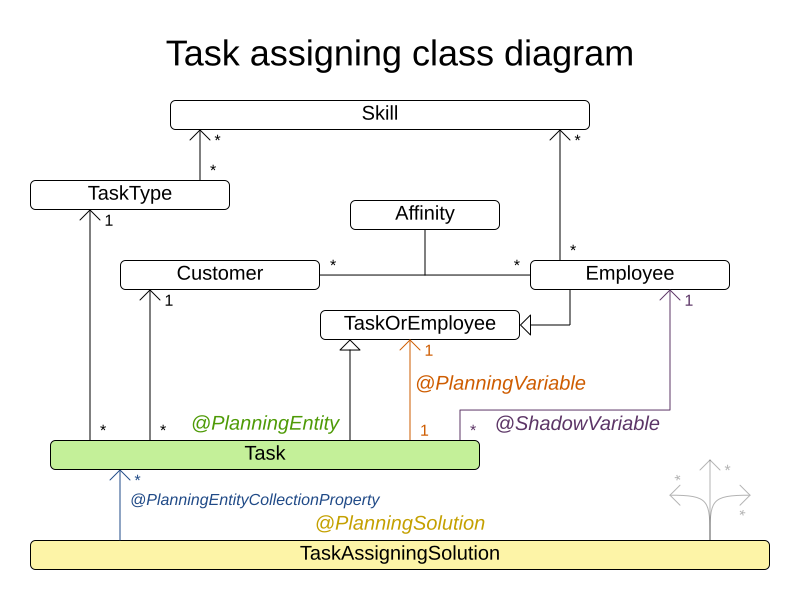
Assign each task to a spot in an employee’s queue. Each task has a duration which is affected by the employee’s affinity level with the task’s customer.
Constraints:
-
[Hard] Skill: Each task requires one or more skill. The employee must possess all these skills.
-
[Soft 0] Critical tasks: Complete critical tasks first, sooner than major and minor tasks.
-
[Soft 1] Minimize makespan: Reduce the time to complete all tasks.
-
[Soft 2] Major tasks: Complete major tasks as soon as possible, sooner than minor tasks.
-
[Soft 3] Minor tasks: Complete minor tasks as soon as possible.
Real-time Planning
As new tasks come in and others start being implemented, the optimal solution might change. OptaPlanner handles such scenarios using ProblemFactChange.
For example, if an employee starts working on a task, tell OptaPlanner to pin this task by sending a PinTaskProblemFactChange.
Each ProblemFactChange type is implemented as a class that implements the interface ProblemFactChange<Solution_>.
In the Task Assignment example, this class can be something like:
public class PinTaskProblemFactChange implements ProblemFactChange<TaskAssigningSolution> {
    ...

    @Override
    public void doChange(ScoreDirector<TaskAssigningSolution> scoreDirector) {
        ...
        scoreDirector.beforeProblemPropertyChanged(toBePinnedTask);
        toBePinnedTask.setPinned(true);
        scoreDirector.afterProblemPropertyChanged(toBePinnedTask);
        ...

        scoreDirector.triggerVariableListeners();
    }
}
The full class can be found on GitHub.
Solver Configuration
The solver configuration file determines how the solving process works. For a KJAR deployed to a KIE Server and since we are using
Drools for score calculation, use a ksessionName. This tells the KieContainer where to find the DRL file.
Add an optataskKsession to META-INF/kmodule.xml file:
<kbase name="optataskKBase" packages="PATH_TO_SOLVER_RESOURCES">
    <ksession name="optataskKsession"/>
</kbase>
And to solver config file:
<scoreDirectorFactory>
    <ksessionName>optataskKsession</ksessionName>
</scoreDirectorFactory>
Notice that both solver configuration and DRL files need to be in the resources folder under the path
PATH_TO_SOLVER_RESOURCES.
For real-time planning, set the solver in daemon mode in order to resume solving once a problem fact change is added. This is accomplished by adding the following to the solver config file:
<daemon>true</daemon>Persistence
Since you will be sending and receiving data to/from KIE Server through REST API, you need to tell it how to marshall/unmarshall this data. Read how OptaPlanner marshals a score using Xstream.
OptaPlanner stores all planning entities as objects and references to these objects, which might result in a lot of redundant data received from the server. In our example, we are using @JsonIdentityInfo to avoid such redundancies.
Dependencies
The minimum required dependencies to build the OptaPlanner service are: optaplanner-core, optaplanner-persistence-xstream.
|
Note
|
Because you will be using several OptaPlanner modules, it’s recommended to import the optaplanner-bom
in Maven’s dependencyManagement so that OptaPlanner version is specified only once.
|
Build and Deployment
Now that you have the KJAR ready, you can deploy it to the KIE Server and perform all planning operations. You can send HTTP requests to the server using REST API.
Deployment
POST /config
Through the above endpoint, you can execute various commands on the KIE Server.
For example, to create a container running your OptaPlanner service, the request’s body should be:
{
  commands: [
    {
      'create-container': {
        'container': {
          'container-id': CONTAINER_ID,
          'release-id': {
            'group-id': GROUP_ID,
            'artifact-id': ARTIFACT_ID,
            'version': VERSION,
          },
        },
      },
    },
  ],
}
Notice that the GAV in the release-id object are your KJAR’s GAV.
Solver registration
PUT /containers/{CONTAINER_ID}/solvers/{SOLVER_ID}
With body:
{
  'solver-config-file': 'PATH_TO_SOLVER_CONFIG_FILE.xml'
}
This will build a new solver from the xml resource included in the KJAR.
Submit a problem
POST /containers/{CONTAINER_ID}/solvers/{SOLVER_ID}/state/solving
Once a solver is built it will be waiting for a problem to start solving. The body of this request contains the object
annotated as @PlanningSolution, in the Task Assignment example it will be TaskAssigningSolution.
Query bestSolution
GET /containers/{CONTAINER_ID}/solvers/{SOLVER_ID}/bestsolution
This response body will contain best-solution object in addition to extra information about the solver status and score.
Submit a ProblemFactChange
POST /containers/{CONTAINER_ID}/solvers/{SOLVER_ID}/problemfactchanges
Submits a ProblemFactChange to update the problem the solver is solving. For example if you want to delete a task the body should be:
<problem-fact-change class="TaDeleteTaskProblemFactChange">
    <taskId>TO_BE_DELETED_TASK_ID</taskId>
</problem-fact-change>
Notice the use of class attribute, this is how you tell OptaPlanner service what type of ProblemFactChange you are submitting.
Here TaDeleteTaskProblemFactChange is an @XStreamAlias for the DeleteTaskProblemFactChange.
|
Note
|
All the requests above have a base URL http://SERVER:PORT/CONTEXT/services/rest/server and require basic HTTP
Authentication for the role kie-server.
|
Check all the available endpoints in the docs.
Conclusion
To integrate an OptaPlanner service with your application on KIE Server:
-
Build the service as a KJAR.
-
Send an HTTP request to the KIE Server to start a container that runs this service.
-
Communicate with the service through the REST API the KIE Server exposes.
 News feed


Comments
Visit our forum to comment